Marketplace Genie
TL;DR
Marketplace Genie is a resale research tool that runs entirely on my own machine. A browser extension captures a listing, a model researches what the item really sells for, and the dashboard ranks everything I've captured by fee-adjusted profit.
The second half is the part I care about more. It records what happened to each deal and grades its own predictions against the results.
Fun Fact
eBay's robots.txt allows the sold-listings path for exactly four crawlers, all of them run by AI model companies. No commercial search API is on the list, and that one line is why the app has two research tiers instead of one.
A flip showing $55 of gross profit, after a 30-mile round trip and an hour of cleaning, nets $9.
The problem with a resale calculator
Every "is this a good flip?" tool I looked at works the same way. You type in a price, it multiplies by something, and it gives you back a confident-sounding number. That number is nearly always too optimistic, for two reasons the interface never mentions. It only knows what people are asking, not what the item sold for, and it doesn't count the drive or the evening you spent cleaning it.
Marketplace Genie is my attempt at a version that accounts for both.
How it works
You open a listing on Facebook Marketplace, Craigslist, OfferUp, eBay, Mercari, or one of a dozen government surplus auction sites, and click the extension. It reads the page and pre-fills the title, price, condition, location, and description. For each field it tries four methods in order and keeps the first one that works: JSON-LD, then OpenGraph tags, then a site-specific adapter, then general heuristics. The popup shows which method it used, so you know how much to trust what it filled in.
Everything is editable, and the price has two checkboxes that matter more than they look: Free and Unknown. An unknown price stays unknown, and the ROI comes back blank instead of made up.
When you save, the item goes into the research queue if you asked for research. Research runs one job at a time, and the dashboard refreshes on its own while anything is still running.
Auction sites need extra care because the figure on the page is a current bid, not an asking price. The tool records the bid count and closing time and reminds you to check the buyer premium. An $8,150 bid with a 15% premium is really $9,372 before you've hauled it anywhere.
Two rules that shaped everything else
The back half of the app rests on two rules I decided early and then had to keep defending against convenience.
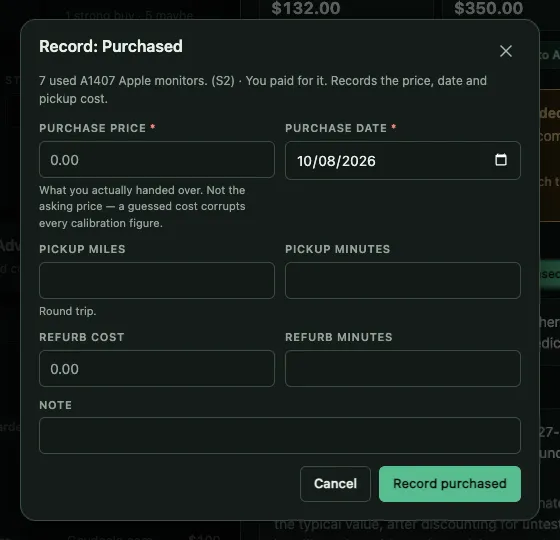
Money is recorded, never guessed. If you didn't type a purchase price, the
deal has no purchase price. The asking price never gets swapped in for it. If
you try to mark something purchased without a price, the app refuses and
nothing changes: no deal record, no stage change. An empty field is rejected
instead of being read as zero, because in JavaScript Number('') === 0, and that
is exactly how "I don't know what I paid" turns into "I paid nothing." Zero and
blank are both allowed and they mean different things. Zero is a free find,
blank is unknown, and an unknown cost produces a blank ROI instead of an amazing
one.
Predictions are locked in at the moment of purchase. When an item is marked
purchased, the current estimate is copied onto the deal: predicted resale
price, profit, ROI, days to sell, and which research tier produced it. That copy
can't be edited, and the API rejects those fields by name. If you correct the
asking price later and run the research again, the live estimate changes while
the deal still shows what was predicted at the time. Without that, the
calibration page would have nothing real to measure.
Was the tool right?
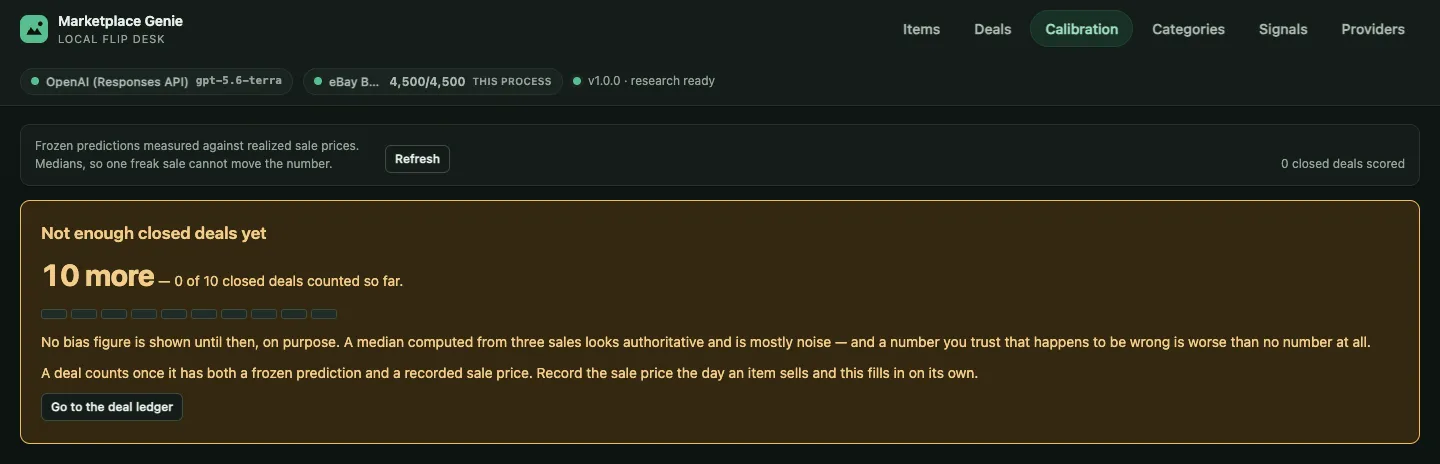
The calibration view answers that question. It compares every locked-in prediction against the sale that followed, reports medians instead of averages so one unusual sale can't skew the headline number, and breaks the results down by category and by research tier. That last breakdown is the most useful part. It can show, for example, that the cheap research tier overprices power tools by 20% while the expensive tier gets the same category right.
It also won't answer too early. Below about ten closed deals, the API reports
reliable: false and the page says how many more closed deals it needs, instead
of showing a confident number based on three sales.
What the drive and the hour cost
A resale estimate that ignores the round trip and the evening spent cleaning and photographing will wipe out small flips. So the settings include a mileage rate and an hourly value for your own time, and the item detail shows the overhead next to the gross profit:
| mileage | 30 mi × $0.70 = $21.00 |
| time | 60 min × $25/h = $25.00 |
| overhead | $46.00 |
| gross profit | $55.00 |
| net profit | $9.00 |
Missing data still isn't treated as zero here either. A listing with no recorded miles has unknown overhead, so the net profit stays blank instead of matching the gross.
Next to it is annualized ROI, which makes different holding times comparable: 60% over six months loses to 30% in two weeks on the same money.
The line that split the product in two
The most interesting constraint in this project wasn't a design decision. It was something I went looking for and didn't expect to find.
eBay's robots.txt file allows access to /sch/, the sold and completed
listings where real resale prices live, for exactly four crawlers, all of them
run by AI model companies. Everyone else falls under User-agent: *, which
blocks /sch/, and commercial search APIs are part of everyone else.
That means a model searching through its own provider can see what an item sold for, while a search through an external API only sees current asking prices and aggregator estimates, which run high. That difference is where the two research tiers come from:
| Basic | Advanced | |
|---|---|---|
| Purpose | Screen many items cheaply | Decide on one item with confidence |
| eBay sold prices | No, asking prices only | Yes |
| Measured cost per item | ~$0.005 | ~$0.13 |
| Treat the answer as | a first pass | good enough to buy on |
Twenty-five Basic runs cost about the same as one Advanced run, so the intended workflow is simple: capture a batch cheaply, sort by score, and upgrade the promising ones. A Basic run also adds its own limitation to the item's list of risks before scoring, so that caveat stays attached to the verdict in the item's history.
The listing kit, and the photos it won't give you
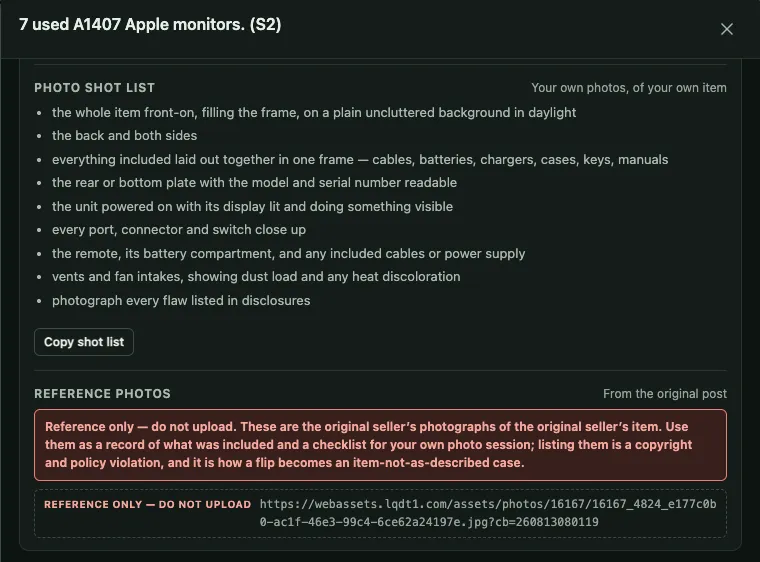
Every researched item gets a listing kit generated on my machine. It includes titles suited to each marketplace (with eBay's 80-character limit enforced, not just flagged), a pricing strategy whose floor is break-even after overhead, item details marked by whether they came from research or from the original post, a plain-text description, and a photo shot list for that type of item.
It also lists every risk the research found, worded so your listing discloses it. Leaving things out is how flips turn into returns.
The one thing it won't do is give you the seller's photos. The original images
show up as a labeled list of links, not a gallery. They can't be dragged, there's
no copy button, and nothing suggests using them. Each link is tagged
[reference only, do not upload] in the text itself, so the warning comes along
even when the data is read through the API. Those are the original seller's
photos of the original seller's item, and every major marketplace requires
photos of the actual item being sold. They're there as a record of what the post
claimed and as a checklist for taking your own photos.
Where it runs
It runs only on my computer. The server accepts connections from the same machine only, the database is a local SQLite file, and the only outside network call is the research request. With no API key set, it still works: capture, browsing, and the sourcing signal library all work, and the dashboard says clearly that valuations are turned off.